Tutorials
How to Manage Your Crypto Portfolio on Solana
Learn how to check your Solana wallet balance, analyze SPL token holdings, send crypto, and manage your wallet using SolPilot, an AI assistant for Solana.
On this page
Why Manage Your Solana Portfolio?
Managing a crypto portfolio involves more than checking your SOL balance. You may hold several SPL tokens, need to understand their estimated value, or want to transfer assets between wallets. Finding the information you need and carrying out each operation can require several steps in a traditional wallet interface.
SolPilot is an AI assistant for Solana that lets you interact with your wallet through natural language. Instead of navigating every operation manually, you can ask questions about your holdings, request a portfolio summary, or prepare a supported transaction through a conversational interface.
ℹ️ What SolPilot does today
SolPilot currently focuses on wallet balances, SPL token holdings, portfolio analysis, and transfers of SOL and SPL tokens. Token swaps, historical performance tracking, and automated portfolio monitoring should not be assumed to be available.
1. Check and Analyze Your Solana Portfolio
The first step in managing a Solana portfolio is understanding which assets your wallet holds. SolPilot can retrieve available wallet information and present it in a conversational format.
Depending on the data available, you can use SolPilot to:
- Check your SOL balance. - View your SPL token holdings and quantities. - Consult estimated portfolio value in US dollars when price data is available. - Retrieve available token information, including names, symbols, and prices. - Request a concise analysis of your portfolio.
For example, you could ask: "Analyze my Solana portfolio and summarize my current holdings." SolPilot can use the available wallet and token information to produce an overview without requiring you to inspect each asset individually.
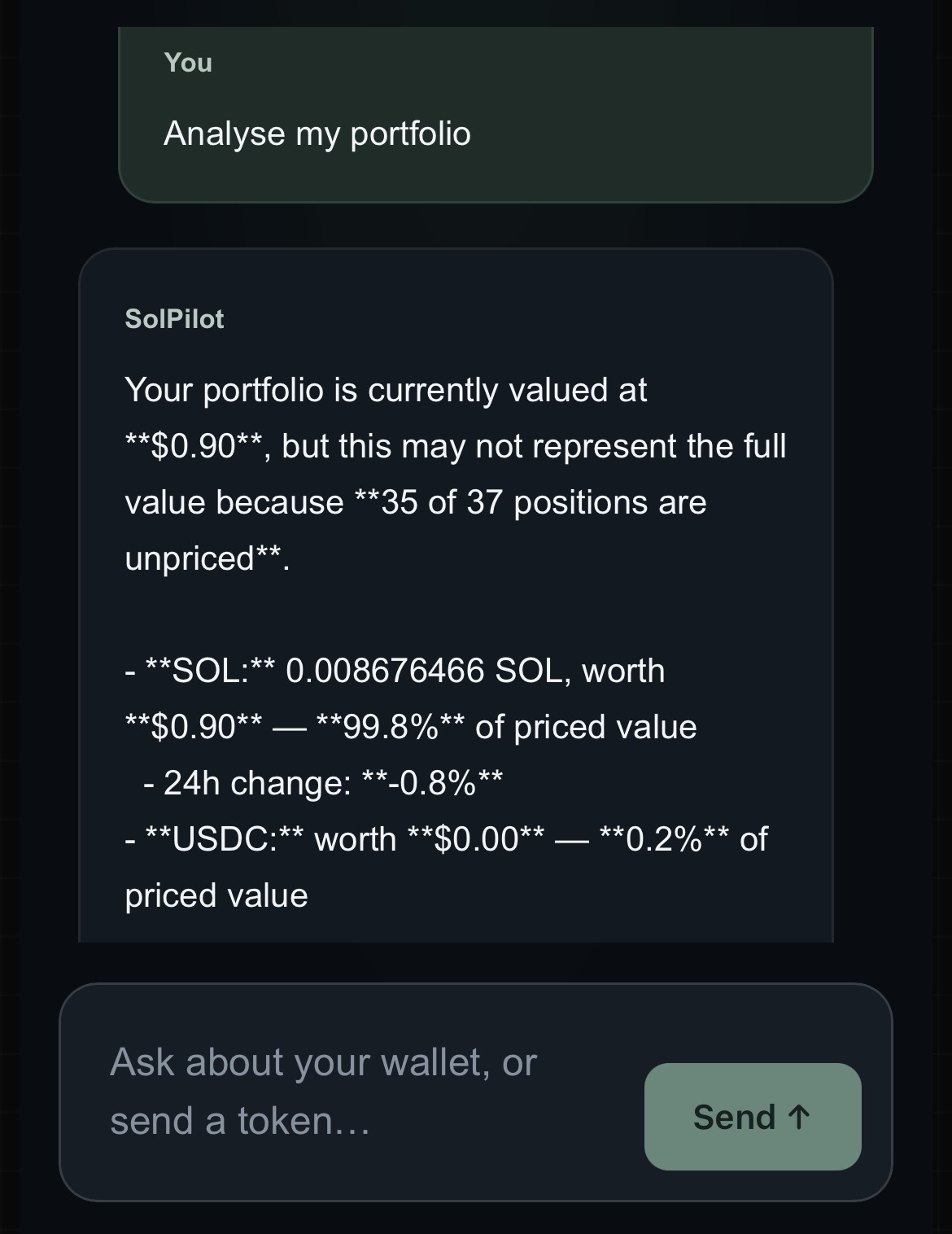
⚠️ Estimated values are not guaranteed
Portfolio valuations depend on the availability and quality of token price data. Some assets may not have a reliable or available price, so the displayed total may not represent the complete market value of your wallet.
2. Manage Your Wallet Using Natural Language
SolPilot uses a conversational interface to make supported wallet operations easier to request. You describe what you want to understand or do, and the assistant works with the functionality available in the application.
Examples of questions you can ask include:
- "What tokens do I currently hold?" - "What is my estimated portfolio value in USD?" - "Give me a summary of my Solana portfolio." - "How much SOL is available in my wallet?"
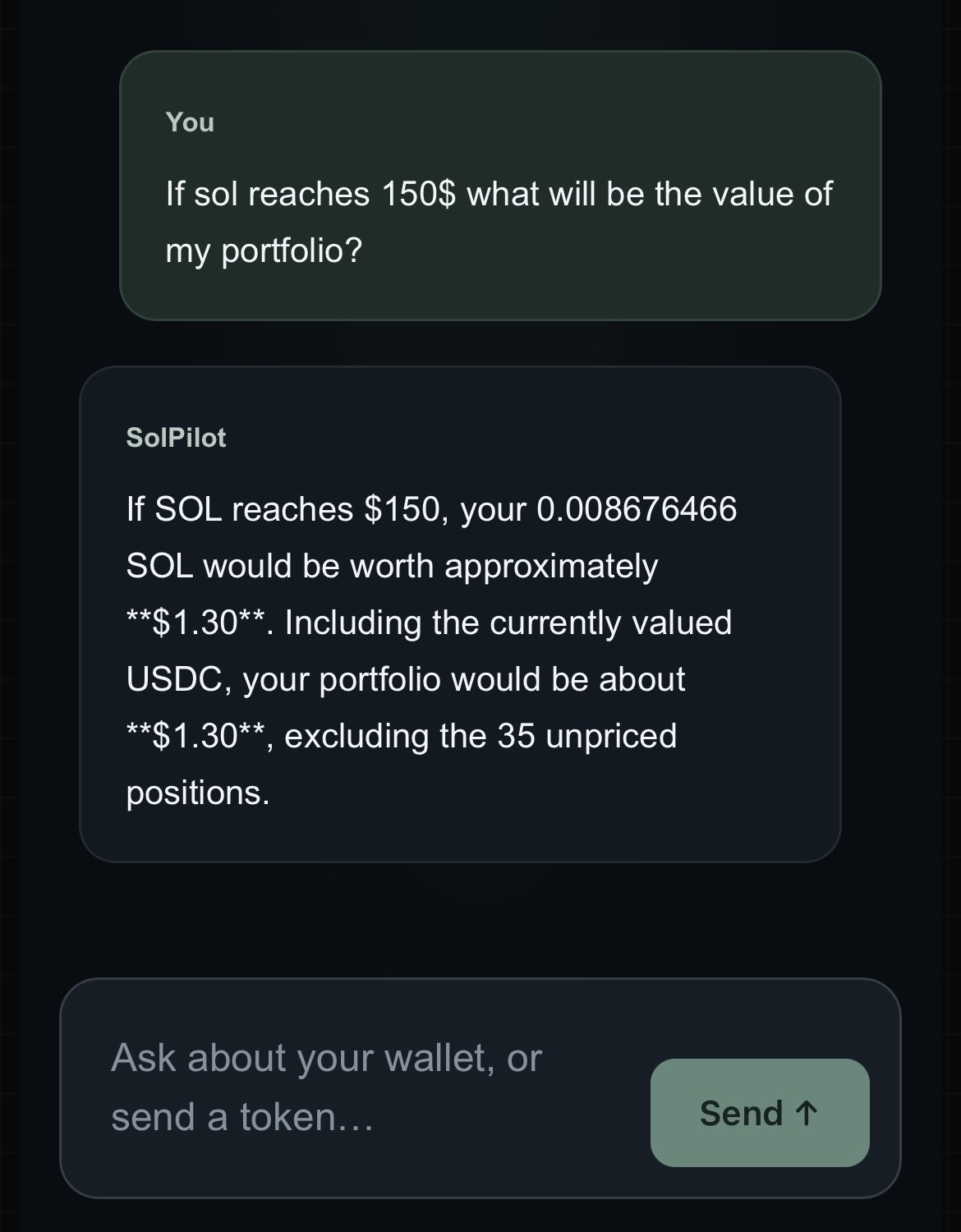
These prompts are examples, not guarantees that every question will produce a complete answer. Results depend on the wallet data, token information, and tools available to SolPilot at the time of the request.
The purpose is to reduce the effort needed to retrieve and understand wallet information. SolPilot is an assistant for making sense of your holdings, not an autonomous portfolio manager that independently decides how your funds should be invested.
3. Send SOL and SPL Tokens with SolPilot
SolPilot can also help you prepare transfers of SOL and SPL tokens to another Solana address. You can describe the intended operation conversationally rather than navigating every step manually in a traditional wallet interface.
Before a transfer, SolPilot can check certain prerequisites, including whether the destination address is valid, whether the wallet has sufficient funds, and whether enough SOL is available to cover network fees.
The general process is:
1. Connect your Solana wallet and start a SolPilot session. 2. Describe the transfer you want to make, including the asset, amount, and destination. 3. Review the operation and any information presented by the application. 4. Approve and sign the transaction using your connected wallet when prompted.
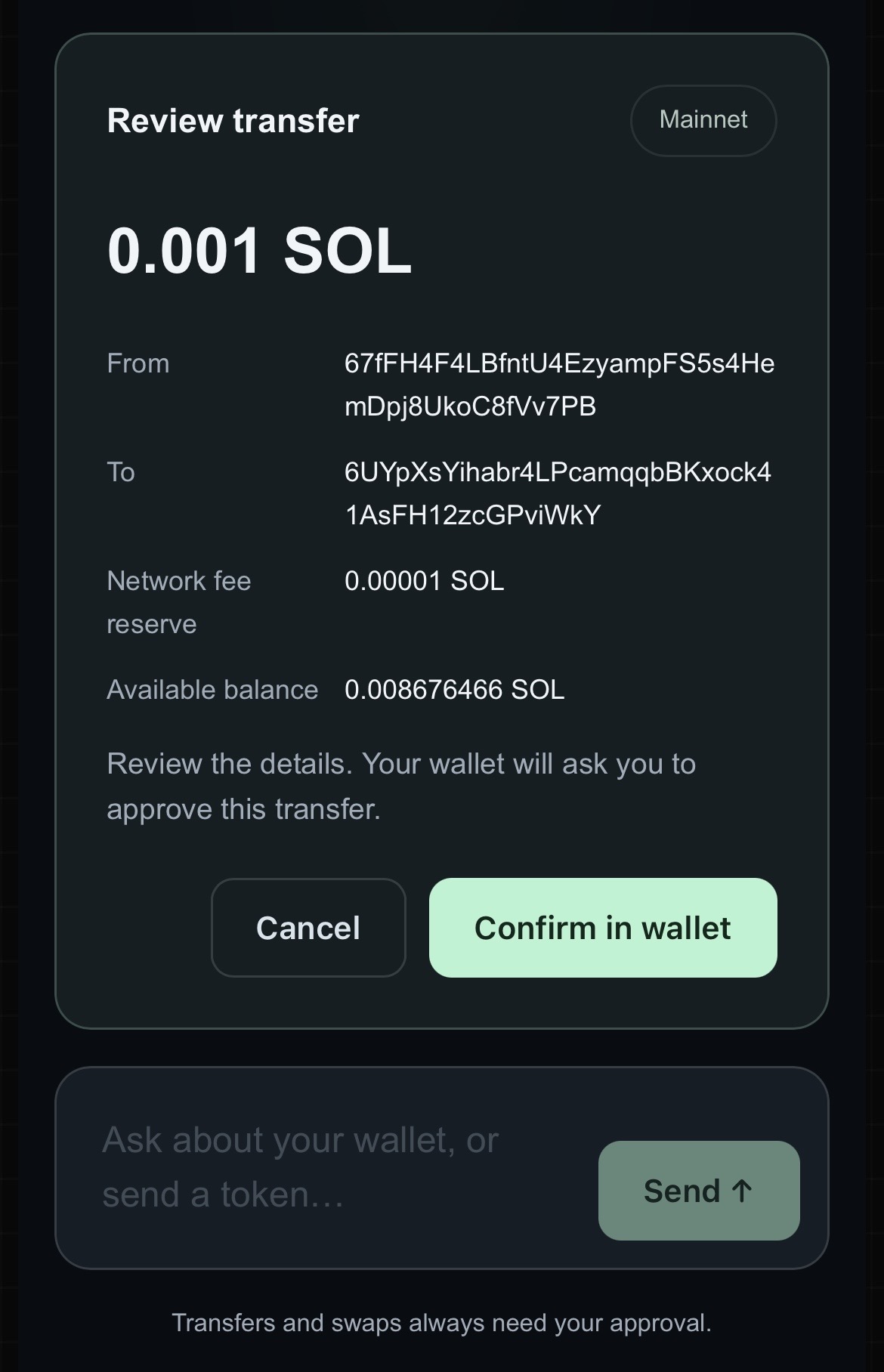
⚠️ You remain in control
SolPilot can prepare a supported transaction, but the transfer requires approval and a signature through the connected wallet. Always verify the destination address, asset, and amount before signing.
Solana network transaction fees are separate from the price of a SolPilot session. The wallet must have enough SOL to cover applicable network fees.
4. How SolPilot Sessions Work
SolPilot uses sessions to provide access to its AI assistant. You connect your wallet to begin using the application, then interact with the assistant during your session.
A session is the access period associated with the session payment and its included AI credit. It is important to distinguish the cost of starting a session from the amount allocated specifically to AI usage.
The current session flow can be understood in three steps:
1. Connect your wallet to SolPilot. 2. Pay for a session to access the assistant and receive the included AI credit. 3. Use the assistant for supported requests while managing your session and credit according to the information displayed in the application.
Sessions are started or renewed manually. SolPilot does not automatically start a new paid session on your behalf.
ℹ️ A session does not mean autonomous control
Connecting a wallet allows SolPilot to work with the wallet information and supported features available to the application. Transactions that move funds still require approval and signing through the connected wallet.
A session ends when its included 0.02 USDC of AI credit has been fully consumed. Once the credit is exhausted, the user must manually start a new paid session to continue using the assistant. Sessions are not renewed automatically.
ℹ️ When does a session end?
Each session includes 0.02 USDC of AI credit. The session ends when this credit is fully consumed. To continue using SolPilot, you must manually start a new session for 0.10 USDC.
5. How Much Does SolPilot Cost?
SolPilot currently uses a session-based payment model with AI usage credit included in each session. The current price and included credit are:
| Item | Amount |
|---|---|
| Session payment | 0.10 USDC |
| AI credit included | 0.02 USDC |
In practical terms, paying 0.10 USDC gives you access to a session that includes 0.02 USDC of AI credit. The full session payment is not the same as the amount allocated to AI usage.
The included AI credit is used for AI requests according to SolPilot's usage model. The amount of credit consumed can depend on how the assistant is used. Check the application for the current credit balance and any usage information provided.
⚠️ Understand the two amounts
The 0.10 USDC session payment and the 0.02 USDC AI credit serve different purposes. Do not interpret the included credit as 0.10 USDC of AI usage. Solana network transaction fees are also separate.
Starting or renewing a session is a manual action. Before paying, review the amount shown by the application and make sure you understand the included credit and the terms displayed for that session.
6. Security and User Control
When using an AI assistant connected to a crypto wallet, it is important to understand the difference between asking for information and authorizing a transaction.
SolPilot can retrieve available wallet information, analyze holdings, and prepare supported operations. Sending SOL or SPL tokens requires the user to approve and sign the transaction through the connected wallet.
Before approving a transfer, verify the destination address, the token, and the amount. You should also ensure that the wallet retains enough SOL to pay the network fee.
💡 Review before signing
Treat the wallet's transaction approval screen as the final checkpoint. Never sign a transaction if its details differ from what you intended.
These safeguards do not replace your own verification, and they should not be interpreted as a guarantee that every transaction or token is safe. SolPilot should be used as an assistant, while the user remains responsible for reviewing and approving transactions.
7. What SolPilot Does Not Yet Offer
SolPilot is under development, and its current capabilities should be distinguished from features that may be added in the future.
The following capabilities should not be assumed to be available:
- Token swaps: still under development and not presented here as an operational feature. - Historical portfolio performance and cost-basis tracking. - Advanced security audits of tokens or transactions. - Continuous wallet monitoring and automatic alerts. - Autonomous portfolio management or automatic investment decisions.
For now, SolPilot is best understood as a conversational assistant for checking and understanding a Solana wallet and preparing supported transfers, with the user retaining control of transaction approval.
8. Try SolPilot
If you want a more conversational way to check your Solana holdings, understand available portfolio information, and prepare SOL or SPL token transfers, SolPilot brings these tasks into an AI-assisted interface.
Connect your wallet, review the session price and included AI credit, and start with a simple question about your portfolio. For transactions, always review the details and approve the operation through your wallet.
Frequently Asked Questions
What is SolPilot?
SolPilot is an AI assistant for Solana that lets users check wallet balances, view SPL token holdings, request a portfolio summary, and prepare supported SOL or SPL token transfers through a conversational interface.
Can SolPilot analyze my Solana portfolio?
Yes. SolPilot can summarize available wallet holdings and provide estimated portfolio values when price data is available. Valuations may be incomplete when token price data is missing.
Can I send SOL and SPL tokens with SolPilot?
SolPilot supports preparing SOL and SPL token transfers. The user must review and approve the transaction and sign it through the connected wallet.
How much does a SolPilot session cost?
The current session payment is 0.10 USDC and includes 0.02 USDC of AI credit. The session payment and the included AI credit are different amounts. Network transaction fees are separate.
When does a SolPilot session end?
A session ends when its included 0.02 USDC of AI credit has been fully consumed. To continue using the assistant, the user must manually start a new session for 0.10 USDC. Sessions are not renewed automatically.
Does SolPilot have access to move funds without my approval?
SOL and SPL token transfers require approval and a signature through the connected wallet. Users should review transaction details before signing.
Can I swap tokens or track historical portfolio performance with SolPilot?
Token swaps are still under development and should not be considered an available feature. Historical portfolio performance and cost-basis tracking are not confirmed capabilities.
Does SolPilot monitor my wallet and send automatic alerts?
Continuous wallet monitoring and automatic alerts are not confirmed features. SolPilot should not currently be treated as an always-on portfolio monitoring service.
Ready to launch your own token?
Create an SPL token directly on Solana in less than a minute. No coding. No custody. Everything happens on-chain from your wallet.
Create your token →Continue reading
What is an SPL Token? A Beginner's Guide to Solana Tokens
Learn what an SPL Token is, how it works, what information it contains, and how it differs from Ethereum's ERC-20 standard.
How to Revoke Mint Authority and Freeze Authority
Learn when and why to revoke your token authorities, how to do it with Token Creator and how to verify the result on-chain.