Tutorials
How to Create a Solana Token
Learn how to create your own SPL Token on Solana in just a few minutes, from choosing a name to verifying it on-chain.
On this page
Before you start
- Phantom wallet
- Some SOL
- Token name
- Token symbol
- Logo
1. Configure your token
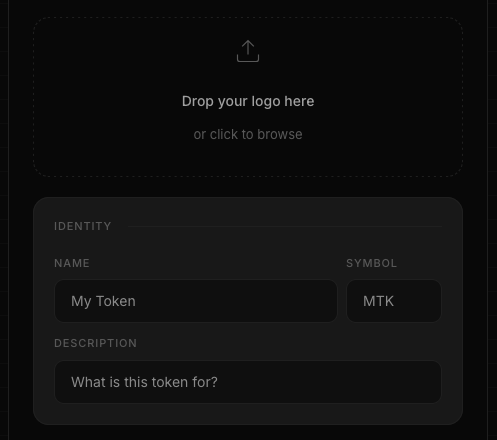
Start by choosing how your token will appear across the Solana ecosystem. Enter a name, choose a symbol, write a short description and upload a logo.
💡 Best practice
Use a square logo (512×512 pixels or larger) and a short symbol so your token displays correctly across wallets and explorers.
2. Review supply and fees
Choose the initial token supply and the number of decimals. Before signing the transaction, Token Creator displays a complete breakdown of the transaction costs.
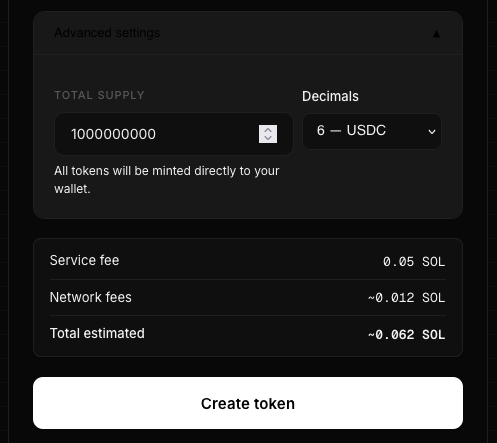
| Fee | Purpose |
|---|---|
| Token Creator fee | Covers the token creation service. |
| Account creation | Creates the required on-chain accounts. |
| Network fee | Paid to the Solana blockchain. |
3. Create your token
Review the information carefully before approving the transaction in your wallet.
Once confirmed, your SPL Token is immediately created on-chain.
4. Secure your token
After creating your token, you can revoke the Mint Authority and Freeze Authority. This is optional but recommended for most fixed-supply community tokens.
💡 Best practice
Revoking both authorities increases transparency because no wallet can mint additional tokens or freeze token accounts.
5. Verify your token
Once the transaction is confirmed, verify your token on Solscan.
Check the token supply, metadata and authorities.
Common mistakes
⚠️ Avoid these mistakes
Double-check the token supply, decimals and authorities before signing. Some settings cannot be changed later.
Frequently Asked Questions
How much does it cost to create a Solana token?
You need a small amount of SOL to pay the network fee and account creation costs.
Can I change the token name later?
Yes, if the Metadata Account remains updateable.
Should I revoke Mint Authority?
Most fixed-supply tokens do.
Can I create a token without coding?
Yes. Token Creator lets you create an SPL Token directly from your browser.
Ready to launch your own token?
Create an SPL token directly on Solana in less than a minute. No coding. No custody. Everything happens on-chain from your wallet.
Create your token →Continue reading
What is an SPL Token? A Beginner's Guide to Solana Tokens
Learn what an SPL Token is, how it works, what information it contains, and how it differs from Ethereum's ERC-20 standard.
What is Token Metadata?
Learn what Token Metadata is on Solana, what information it stores, and why wallets use it to display your token.
What is Mint Authority?
Learn what mint authority is on Solana, why it matters for your token, and when you should revoke it.
What is Freeze Authority?
Learn what Freeze Authority is on Solana, when it should be revoked, and why investors pay close attention to it.